
Text in the Description screen can be arranged in separate paragraphs. A paragraph is a portion of text that is ended with a hard return. Every paragraph has a number of settings that can be modified, such as alignment, indentation, line spacing and pagination.
Note: You can create a hard return by pressing the ENTER key at the end of a text. To see the formatting symbols, click ¶ on the Description toolbar, or in the View menu Description Screen Options > Options > ¶ Show/Hide.
You can change paragraph settings as follows:
- Place the cursor in the Description screen at the place you want to apply the settings, or select those paragraphs to which you want to apply new settings.
- Choose Paragraph from the context menu.
Note: Some of the paragraph settings can be adjusted on the Description toolbar (see Description Screen Toolbars). Whenever an option is also available on the toolbar, it will be indicated with a ‘*’ in the rest of this explanation. - The Paragraph window has two tabs:
Indents and Spacing tab:
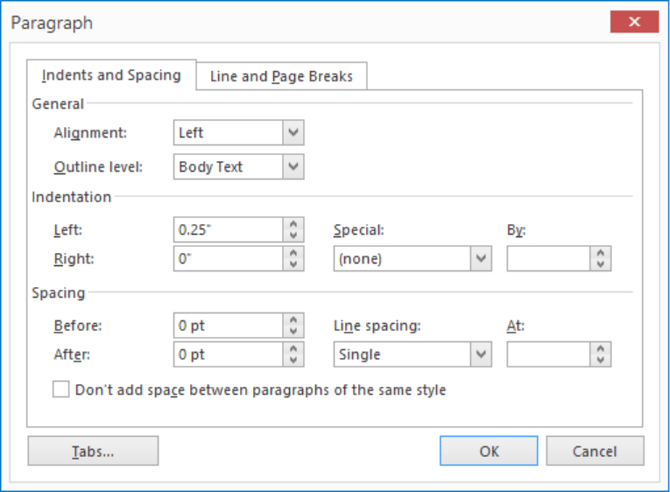
You can change the following settings in the Indents and Spacing tab:
- Alignment*; horizontal alignment of the paragraph/text.
- Outline Level; The level of the Outline.
- Indentation:- Left and Right; indent the entire paragraph with a certain amount of centimetres from the left and/or the right.
- Special and By; Indent the first line of the paragraph from the left by a specific number of centimetres.
- Spacing:
-
-
Before and After; vertical free space (height in pts) before and after the paragraph.
-
Line Spacing and At; relative distance between lines (single, 1.5 lines, double).
-
Line and Page Breaks tab:
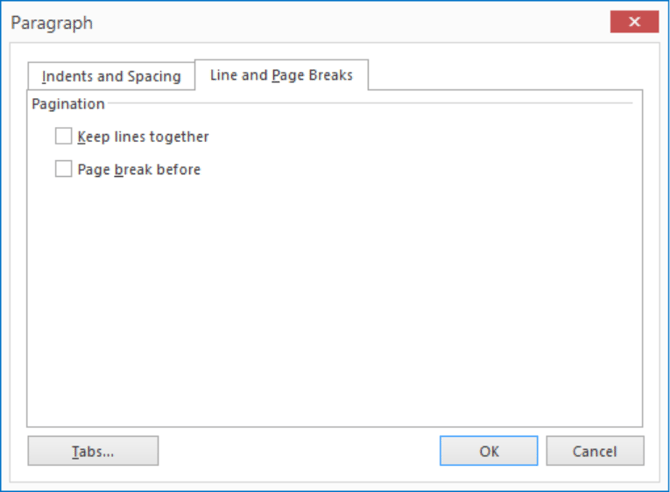
You can change the following settings on the Line and Page Breaks tab:
- Keep lines together; prevents (an automatic) page break in a paragraph.
- Page break before; Inserts a page break before the selected paragraph.
