
After you have created a table, it is possible to delete the entire table, or parts of the table.
Delete Cell(s):
- Select the cell or cells that you want to delete.
- Right-click and select Delete Cells.
- The following window appears:
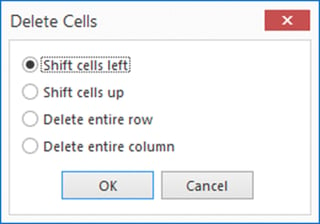
- Select Shift cells left, Shift cells up, Delete entire row or Delect entire column.
Delete Table:
- Select the table you want to delete.
- Press the Delete key, on your keyboard.
