
Fields and Field Sets are created as follows:
1. Select Field Administration from the Administrative Tools group on the Administration tab.
The following screen will be shown:
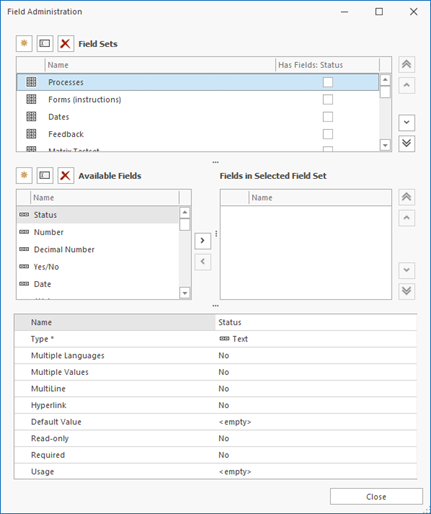
The window is divided into 3 sections. These sections are as follows:
· Top Section: Field Sets. Here you can create, rename and delete field sets in the database.
· Middle Section: Fields. This is where you can create, rename and deleted fields to be used in the field sets. You can also define which fields will be added to or removed from the selected Field Set.
· Bottom Section: Field Properties. This shows the details of the currently selected field. This information can be changed as needed.
Note: Fields that have already been assigned to a field set will no longer appear on the left hand side of the middle section, only on the right.
Note: Field sets need to be defined carefully. If you change a definition later, it can result in data loss: see Changing a Definition.
