
Now that the base URL for the paramerterized URL has been configured, we can put it into use as follows. We have created a field set and assigned it to a topic:
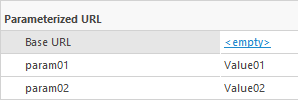
(param01 and param02 are text fields)
We also need to remember that the Base URL is as follows: https://www.test.com/{*}
(notice that we have a slash at the end of the URL already configured in the Base URL!)
1. Edit the value for the Base URL field.
2. Now we configure which fields will be used to complete the URL using the values of those fields as parameters for the URL. Use the following syntax: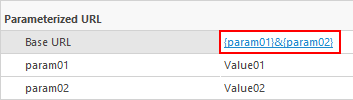
3. Here we have used the following parameters:
{param01}&{param02}
This will result in the following URL if you click on the Base URL:
https://www.test.com/Value01&Value02
Notice that the values of param01 and param02 have been substituted.
Alternatively you can replace the "&" symbol with "/" which will produce the following URL:
https://www.test.com/Value01/Value02
Using this function allows you to create any URL you need, based on the values of fields.
