
In the Topics screen you can see the filing cabinets:
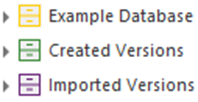
The meaning of the colors is as follows:
Yellow Filing Cabinet:
This folder is your working area in the database; you enter your information here. Several standard sections are shown, such as the Relationship Categories and the Recycle Bin.
Green Filing Cabinet:
This folder contains all created versions. See Versions.
Purple Filing Cabinet:
This folder contains all created versions that have been imported from other databases.
