Target audience: Mavim users who want to reuse topic structures while maintaining a mirrored relationship between source and destination.
Core purpose: This article explains how to create a mirrored coupled copy of a topic, including its child topics, and paste it into a new location in the topic tree.
Steps to create a mirrored coupled copy
-
Select the source topic
Choose the topic you want to mirror. -
Open the context menu
Right-click the selected topic and click Mirrored Coupled Copy.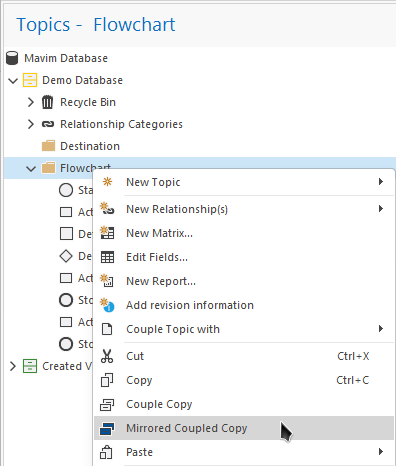
- Navigate to the destination topic
Go to the topic where you want to paste the mirrored copy. -
Paste the mirrored copy
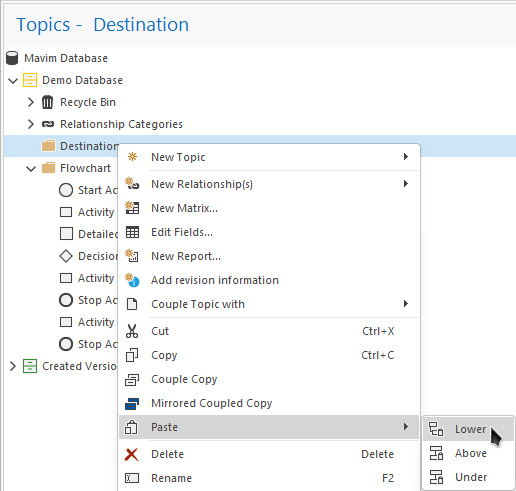
Right-click the destination topic and select Paste.
You can paste the mirrored copy in one of three positions:- Lower
- After
- Before
-
Verify the mirrored copy
The selected topic and all its child topics will appear in the new location.
Mirrored coupled copies are indicated by a blue square sub-icon.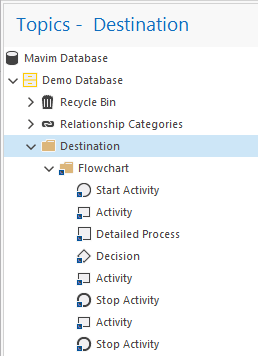
Important notes
- Changes made to the source topic will be reflected in the mirrored copy.
- Deleting the source topic does not automatically delete the mirrored copy.
- You can create mirrored copies across different branches of the topic tree.