
BPMN Recap - Basic Elements: Events, Activities and Gateways
The letters BPMN stand for Business Process Model and Notation. It is a standardized charting technique that is used globally for business process modeling. Over time, BPMN has become a de-facto standard for business process diagrams. BPMN is maintained by the Object Management Group and is also ratified by the International Standards Organization.
The field of Business Process Management is in favor of standardization and often uses software platforms that include the BPMN language. The Mavim platform is among them, meaning that businesses can configure their systems to work together with the Mavim software by exchanging data in the BPMN format.
Six basic terms you need to be familiar with in BPMN are: Events, Activities, Gateways, Pools, Lanes and Flows. We will explain a bit more about these during this and the next module.
Events
Every diagram has a Start and End event. To understand BPMN, you have to be familiar with the term ‘event.’ An Event is similar to what we call an activity in a flowchart. In short, it is something that “happens” during the course of a Process. Events affect the flow of the process and usually have a trigger and a result.
There are three basic types of Events, based on when they affect the flow. These are: Start Event, Intermediate Event and End Event. BPMN has a number of markers available to differentiate various triggers or results. We will explain these in more detail later.
 |
Start Event |
This Indicates where a Process will start. |
 |
Intermediate Events |
This event occurs between a start and an end event. |
 |
End Event |
This Indicates where a Process will end. |
Activities
Activities represent points in a Process flow where work is performed. They are the executable elements of a BPMN Process. Activities can have markers added to them. We will not explain these during this module.
|
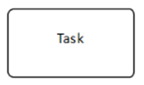
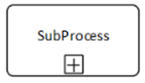
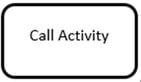
The three types of Activities that can be part of a Process are: |
|
|
Task |
 |
|
Sub-process |
 |
|
Call Activity |
 |
A Task is the lowest level of detail as far as BPMN activities go. It can be broken down to a lower level of detail by adding a description in the Mavim description screen, or visually by changing it to a sub process with tasks on a detailed level within.
A Call Activity allows for the inclusion of re-usable Tasks and Processes from elsewhere. You can use a Call Activity to refer to a task from an external process in respect to the process being modeled or viewed.
A Sub-process can be described as an activity that is broken down into a finer level of detail through sub-activities. It represents a sequence of activities that work together to perform a part of a total process. A Sub-process can have an expanded or collapsed representation.
Sub-processes can be expanded and collapsed to make the process more compact and thus better readable for end-users or viewers. A process can contain multiple sub-processes and hence a lot of detail that would distract from the bigger picture. When a Sub-process is expanded, all the details contained in the Sub-process are shown. In a collapsed Sub-process, the details are not visible in the process diagram, making the visualization of the business process easier to read.
Gateway
If an activity needs to go through different process flows, you use an event gateway. A Gateway is used to control the divergence and convergence of Sequence Flows in a Process. A gateway is displayed as a diamond, with an internal marker inside. Markers will indicate the type of behavior of the gateway. We will now explain the six different types of gateways mentioned in the BPMN specification.
|
Exclusive Gateway |
 |
|
Event-based Gateway |
 |
|
Parallel Gateway |
 |
|
Inclusive Gateway |
 |
|
Complex Gateway |
 |
|
Parallel Event-based |
 |
We’ll start with the Exclusive Gateway. An Exclusive Gateway can be used to model alternative paths within a flow. It is where the diversion takes place. It means the process should be followed through either this path, or the other path. This type of gateway is commonly used for yes / no decisions.
Next is the Event-based Gateway. An Event-based Gateway is immediately followed by multiple events, which are all linked to different paths. The event that occurs first will activate the path it is part of and bypass any other paths.
A Parallel Gateway can be used to create and join parallel flows. When a Parallel Gateway is added, both paths should be followed at the same time.
An Inclusive Gateway means one or multiple paths of the process will be followed, thus it can create Parallel Paths.
The Complex Gateway type is not used often. It is used to describe a situation that cannot easily be modeled using Parallel, Inclusive or Exclusive gateways. It uses words in place of symbols and, therefore, requires more descriptive text to be added to an annotation.
Finally, the Parallel Event-based gateway is similar to a Parallel Gateway, but unlike the Parallel Gateway, the execution of the rest of the process depends on a number of events. Here, multiple events must occur to start a single flow.
Pools and lanes
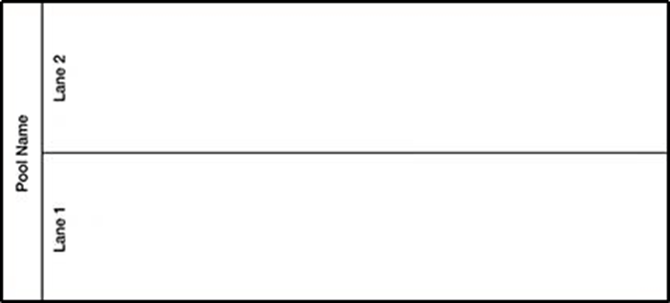
A Pool represents a full business process. For a simple business process, a single pool is sufficient. It becomes more interesting, though, if multiple processes must work together to achieve a result. In that case, these processes can be described in the same diagram using multiple pools. Processes inside these pools can be connected by message flows, which will be explained later.
You will likely be familiar with swim lanes in business processes. They are used in the Cross-function Flowchart, which has been covered in your Mavim Manager course. Within BPMN, a Lane has the same definition. Lanes are used to organize and categorize Activities by allocating them to roles, systems or departments.
Sequence Flow and Message Flow
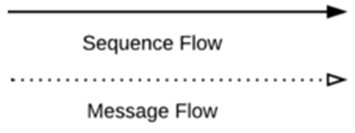
The lines and arrows in a BPMN chart are called sequence flows or message flows. A sequence Flow can be recognized by its solid line. Sequence Flows show the order of flow elements in a process, connecting activities with each other, as well as with events and gateways to precisely express the order of execution. Note that Sequence Flows can only connect elements that are within the same Pool.
A Message Flow can be recognized by its dotted line. It shows the flow of messages and can be used to trigger a flow in another pool. Some examples of messages that flow between pools are an email, a notice, a telephone call or a letter. The message can be triggered in one Pool and activate a flow in the other Pool.
End of Introduction
This article serves to give you an overview of the most important elements in BPMN 2.0, but there's much more to the modelling language. For more information please download the newest version of the BPMN specifications here: https://www.omg.org/spec/BPMN/2.0.2/PDF
