
A SAP transaction is added as follows:
1. Open the SAP Connection Manager using one of the following options:
· In the ribbon select Tools tab > Web section > External connections website > SAP...
· In the ribbon select Edit tab > Couple Topic With section > SAP...
· Open the context menu of a Mavim topic and select Couple Topic with > SAP...
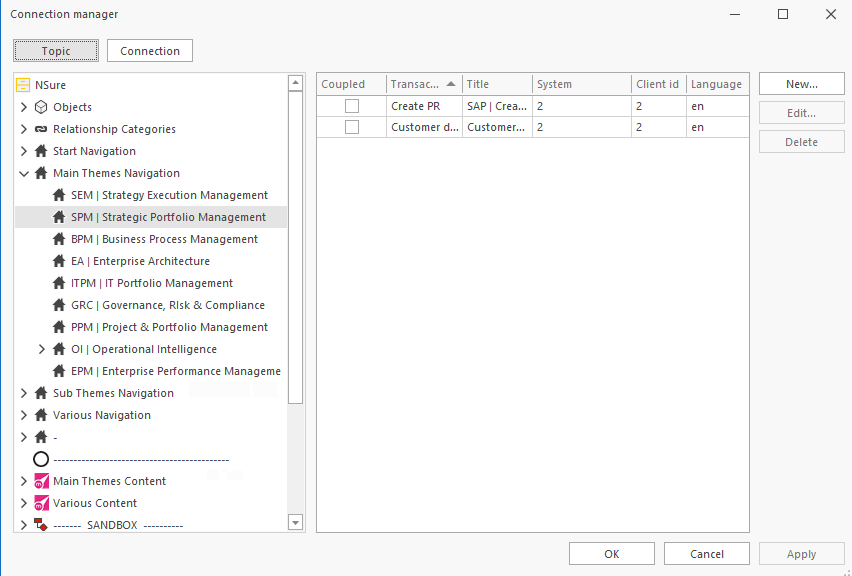
2. Click New...
The following screen appears: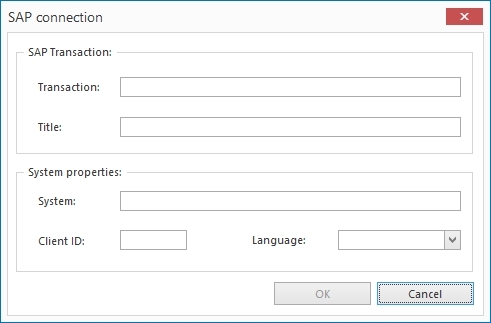
3. Enter the following information:
Transaction: the code of the transaction you want to open.
Title: the name you want to display in the Mavim website to open the transaction.
System: the name of the SAP system.
Client ID: the information that allows you to log into the SAP system.
Language: the language in which you want to open the transaction.
4. Click OK when you have completed the fields.
The transaction is added to the Connection Manager's right* section.
* If you click the Connection button the right and left hand section will switch location and functionality.
