
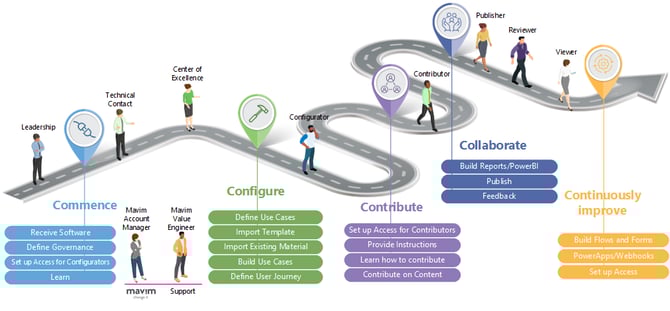
For a full overview of the onboarding process see the following article:
Get Started with Mavim - Customer Journey
As a Technical Contact or Center of Excellence you wish to know what to provide to each of the roles involved in onboarding Mavim in your organization.
Technical Contact
Summary
Serves as the technical liaison between Mavim and the customer. Handles the initial rollout, receives software and credentials, sets up MCC, assigns licenses, and supports technical components such as flows, forms, and webhooks.
Serves as the technical liaison between Mavim and the customer. Handles the initial rollout, receives software and credentials, sets up MCC, assigns licenses, and supports technical components such as flows, forms, and webhooks.
Required licenses
- Connect Center permissions
- Portal administrator
Training
- Mavim Connect Center microlearning
- Additional modules for flows, forms, and webhooks
Center of Excellence (CoE)
Summary
Holds the broadest platform expertise. Owns governance, creates internal standards, and delivers project outcomes and internal training.
Holds the broadest platform expertise. Owns governance, creates internal standards, and delivers project outcomes and internal training.
Required licenses
- Connect Center permissions
- Manager Enterprise
- iMprove Enterprise
- Portal Administrator
- Academy – All you can learn
Training
- Mavim Manager Levels 1, 2, 3
- Mavim Portal
- Servicedesk Levels 1 and 2
- Course Development Kit
- Mavim Advanced Framework Design
- Business Process Management workshop
Configurator
Summary
Builds and configures the framework based on strategy and use cases. Imports templates, structures the environment, sets governance in collaboration with the CoE, and builds flows, forms, and related components.
Builds and configures the framework based on strategy and use cases. Imports templates, structures the environment, sets governance in collaboration with the CoE, and builds flows, forms, and related components.
Required licenses
- Manager Enterprise
- Portal Administrator
- Academy – Design, Enterprise
Training
- Mavim Manager Levels 1–3
- Mavim Portal
- BPMN 2.0 in Mavim
- BPM workshop
- Mavim Advanced Framework Design
- Add‑on modules for reports, flows, forms, PowerApps, and webhooks
Contributors
Summary
Creates and maintains business content within the framework designed by Configurators and the CoE.
Creates and maintains business content within the framework designed by Configurators and the CoE.
Required license
- iMprove Enterprise
Training
- Introduction to Mavim iMprove
- Mavim iMprove in practice
- Customer‑specific contributor guidance
Publishers
Summary
Manages the publication process in the portal. Oversees review cycles, versioning, and correct publishing workflows.
Manages the publication process in the portal. Oversees review cycles, versioning, and correct publishing workflows.
Required licenses
- Portal Moderator
- Manager Professional
Training
- Version management
- Publishing to the Portal (all levels)
- Webforms
- Create tasks
- Power BI reports
- Using hyperlinks in generic charts
Reviewers
Summary
Validates content created by Contributors and Configurators. Provides feedback, works with tasks and dashboards, and participates in review workflows.
Validates content created by Contributors and Configurators. Provides feedback, works with tasks and dashboards, and participates in review workflows.
Required license
- Portal Contributor
Training
- Webforms
- Tasks
- Feedback
- Favorites
- Dashboards
- Respond to feedback and subscriptions
- Create tasks
- Mavim Portal for end users
Viewers
Summary
Consumes published content in the Portal. Navigates pages, reads content, and uses search and filters.
Consumes published content in the Portal. Navigates pages, reads content, and uses search and filters.
Required license
- Portal Subscriber
Training
- Mavim Portal for end users
- Customer‑specific subscriber guidance
