Mirrored Coupled Copies provide the same functionality as Couple Copy but add even more functionality. You have the ability to control which data is kept from the source Topic and which data can be changed for the Mirrored Coupled Copy.
Note that charts associated with the source Topic are included in Mirrored Coupled Copies but are read-only. Only changes made to the original chart will be shown in the Mirrored Coupled Copy.
Creating a Mirrored Coupled Copy
Creating a Mirrored Couple Copy is very similar to how a Coupled Copy is created.
- Select the source Topic you would like to create a Mirrored Couple Copy for.
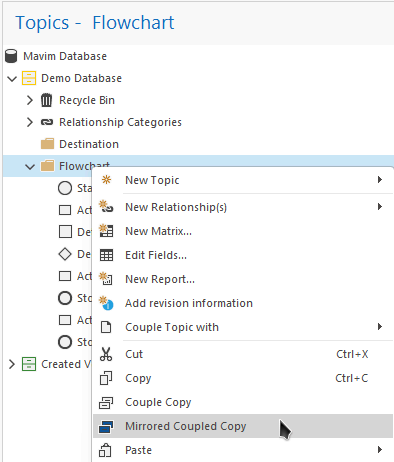
- Open the context menu for the selected Topic and click Mirrored Coupled Copy:
- Now navigate to the destination Topic, open the context menu and select Paste:
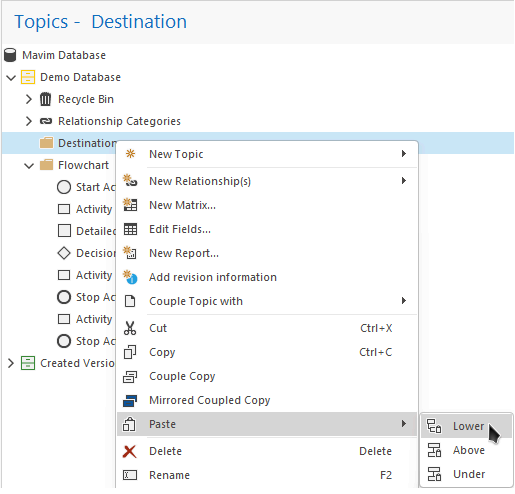
In this example we are choosing to paste Lower but you can paste the Mirrored Coupled Copy at any of the three available locations. - Notice that the selected Topic and all of it's child Topics are copied to the destination location:
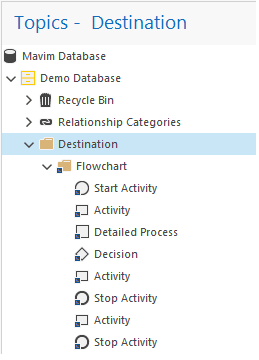
You can see that they are Mirrored Coupled Copies from the blue square sub-icon: