
To create a relationship, select a cell within the matrix and perform one of the following procedures:
|
1. Double-click a cell, or 2. click the Insert button; or 3. use the right-click menu and choose New. |
|

Add a characteristic to the new relationship using the following steps:
|
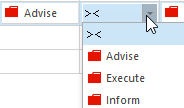
If you want to add an existing characteristic to a relationship:
Click the button with the arrow pointing down and select one of the characteristics in the dropdown menu. |
|
Note: You can add multiple relationships with characteristics in the matrix by using the INSERT key on your keyboard.
Note: If you have a cell selected that has a value in it, you can press the Ctrl + Arrow key (depending on the direction) to copy the value of that cell to the next cell. Note that the value must be valid for that cell the value is being copied to.
