
A matrix is created as follows:
1. In the Topics screen, select the topic (and its relationships) that you want to set out on the vertical axis.
2. Select the Edit tab followed by New Matrix from the Overview group.
The Matrix Definition window opens:
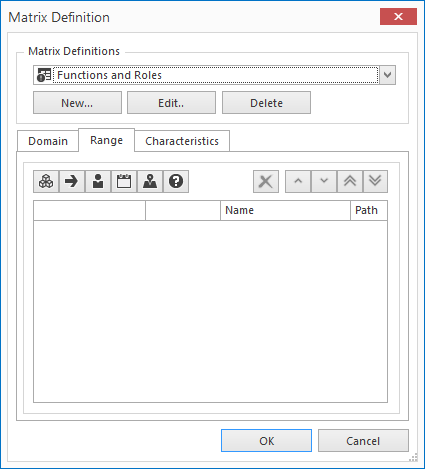
This window consists of three parts:
· Matrix Definition: New Edit Delete
· Domain tab
· Range tab
· Characteristics tab
Matrix Definition
A matrix definition is the group of topics that are set out on the horizontal axis of a matrix. This set can be used in multiple definitions, so it is advisable to give each definition a unique name.
· New: A new window is opened, enter a name for your new matrix and then click OK.
· Edit: Edit an existing matrix definition, see Edit Matrix Definition.
· Delete: Delete an existing matrix definition(s).
Domain
For Domain, you can set how many levels deep the topics in the rows of the matrix will be displayed. By default, this is set to All. You can also indicate whether the rows are expanded or collapsed when opening the matrix.
Range
Click the relationship category buttons  to add a topic (or several topics) to the horizontal axis (columns) of the matrix.
· Click the With What button to select topics from the With What category;
· Click the Who button to select topics from the Who category; etc.
Note: You can select several relationship categories for the horizontal axis. For example, topics from the With What category as well as topics from the Who category.
Characteristics
In the Characteristics tab, you can choose to filter your view of the information to specific characteristics. Only relationships with these defined characteristics are shown in the matrix.
If you do not define any characteristics, the relationships will not be filtered.

Click the button with the cross to delete a topic/characteristic. The arrow buttons can be used to set the order of the topics/characteristics. The topics/characteristics that are at the top of the list are shown at the left of the matrix.
3. Click OK to close the window. The matrix will now be shown according to its definition.
