
When working with coupled copies, it is possible to see an overview of the original topics in the database together with the coupled copies of a topic.
Overview Original/Coupled Copies shows:
- The originals of the coupled copies in the database.
- The coupled copies in the database.
The overview is applicable in the following situations:
- When coupled copies have been made (see Couple Copy Topic). The overview will show the original with its coupled copies.
- If versions have been made (see Version Management). The overview will show the original topic as well as the copies in one or more versions.
To open the overview:
- Select a topic.
- Click Edit or context menu.
- Choose Overview Original/Coupled Copies on the Edit tab or the context menu.
The Overview Original/Coupled Copies window appears with three frames:
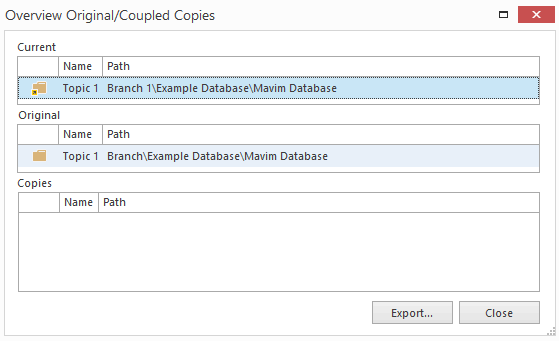
The three frames can show the following, depending on the selected topic:
|
Current = Selected Topic |
Original |
Copies |
|
Original in database (yellow file cabinet) |
|
Coupled copies in database and/or in created versions. |
|
Original in imported version (purple file cabinet) |
|
Coupled copies in database |
|
Coupled copy in database (yellow file cabinet) |
Original in database or original in imported version. |
Copies in created versions |
|
Copy in created version (green file cabinet) |
Original in database |
|
You can save the result as a Excel file with the Export... button.
Note:
You can select another topic in the Topics screen while the Overview Original/Coupled Copies window is open. The information in the window will be automatically updated.
When you click a topic in the Overview Original/Coupled Copies window, you automatically navigate to the same topic in the Topics screen.
