Mavim uses macros when editing Word templates.
The following error message may appear when attempting to edit Word templates:

If you have the rights in your system, you need to modify the security in Word:
In Word Choose the menu path File > Options and Trust Center click Trust Center Settings... At Macro Security, enable Trust access to the VBA project object model and click OK.
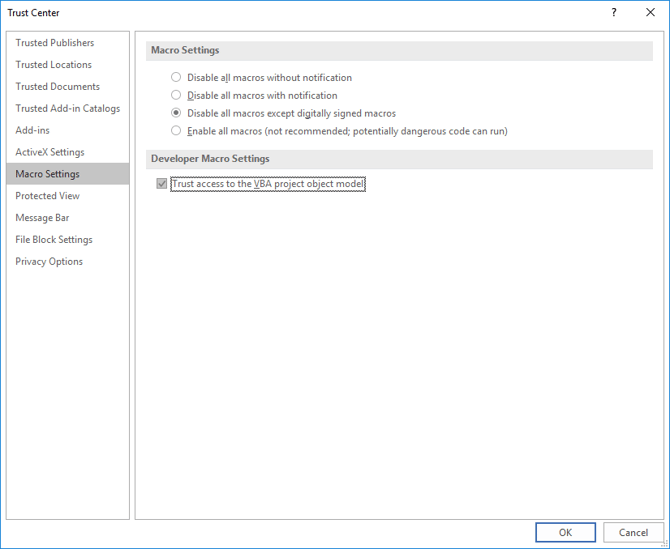
Note: Depending on your Word version, the screen shots/steps that are described here for trusting access to the Visual Basic Project might differ. See the Word documentation for more information on this subject.
If you are not able to change the security in Word, then Mavim cannot add the menu with Mavim Fields and Start Position.
Mavim Fields
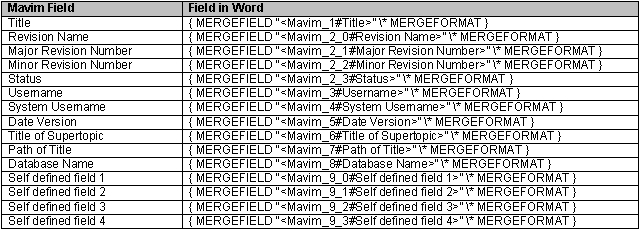
If you do want to use Mavim fields, then you need to add them manually to the Word template. The names and start position bookmarks of the fields are important. See the list below:
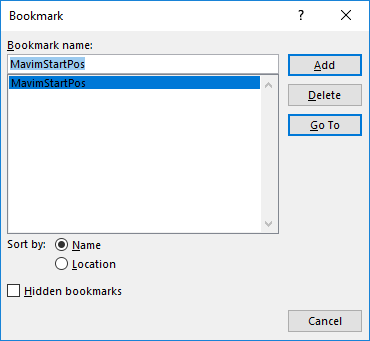
Start Position:
Add the start position using the Word menu option Insert > Bookmark... and complete the window as follows: