
If you would like to uncouple a mirrored coupled copy and continue to work with the topic as a regular topic, Mavim Manager provides a function that can achieve this.
- Select the Mirrored Coupled Copy you wish to uncouple.
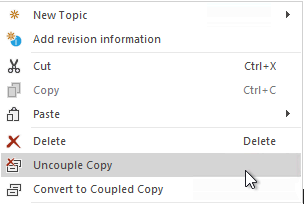
- Open the context menu and select Uncouple Copy.
A progress bar will appear to show the progress of the operation and depending on how many sub-topics are under the mirrored coupled copy, this operation can take a few moments.
Once complete, the topic will be a regular topic and lose all Mirrored Coupled Copy functionality. Changes made to the descriptions of mirrored coupled copies will be retained when uncoupled.
