
With the Couple Copy option it is possible to copy a topic and any relationships that it may have in such a way that changes to the original can be applied to the coupled copy:
- A topic in the proprietary database (yellow file cabinet)
- An imported version (purple file cabinet). See also: Version Management
To make a coupled copy:
- In the Topics screen select the topic or imported version you want to Couple copy.
- Choose Couple Copy on the Edit tab or in the context menu.
- Select the position in the topic tree where you want to place the copy.
- Choose Paste and then Lower, Above or Below to put the copy in the selected position.
See also:
-
Cut, Paste and Copy a Topic
-
Topics: Lower, Above, Below
Couple copied topics have asub-icon on the lower left corner of the Topic icon:
-
 = Coupled copy of a topic from the same database.
-
 = Coupled copy of an imported version.
In the Subtopics screen you can select multiple topics at once by holding the CTRL key or the SHIFT key while clicking the topics with your mouse.
Note:
With What relationships have a different behavior when Couple-copied compared to other relationship types. With What relationships between topics in the branch that is Couple-copied are moved. There is no relationship between the originals and the copies. If the source of the relationship is moved first, and the target is moved subsequently, the relationship will first be created as a GoTo Command without Destination. See Whereto for a more detailed explanation.
The example below illustrates the difference:
There is a With What relationship between Topic 1 and Topic 2, and there is a Whereto relationship between Form 1 and Form 2.
In the coupled copy of Branch, there are only relationships from the copy to the copy, exactly as they were in the original:
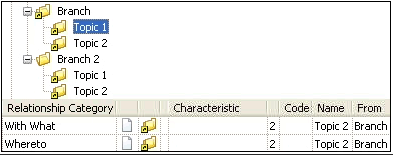
In the coupled copies of Topic 1 and Topic 2 in another branch, Branch 2, relationships are created to the original and the coupled copy. This is why there are 2 With What relationships. This does not apply to the Whereto relationship. There is only a relationship to the copy, which is the same structure as in the original for Topic 2:
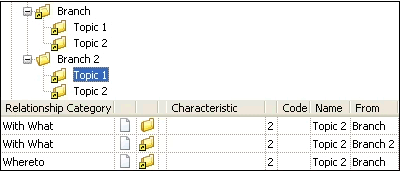
-
To see the original of a coupled copy, you can choose the option: Overview Original/Coupled Copies.
-
It is possible to uncouple a copy from its original. It then becomes an independent topic in the database. See: Uncouple Copy.
