
It is possible to couple topics with external information sources, such as files and programs. In this context, 'external' means information sources that are outside Mavim.
If a Description screen contains a hyperlink to a subject that is coupled to an information source, the user can open the external information source by clicking the hyperlink (see Hyperlinks). A topic can be coupled with:
- A file; see Couple Topic with.
- An Internet address; see Couple Internet Address with Topic.
- An E-mail address; see: Couple E-mail Address with Topic .
A coupling is seen as relationship in the Relationships screen, and can be opened by double clicking the relationship.
Couple Topic with:By default, the following features are not visible as they will soon be removed from the software.
- Couple topic with Internal File
- Couple topic with File
- Couple topic with Network File
- Couple topic with Network Location
It is possible to couple a file with a topic. In every Description screen in which a hyperlink has been created to a topic that is coupled with a file, the user can open the file directly by clicking the hyperlink (see Hyperlinks). The file can also be opened by clicking the With What relationship in the Relationships screen of the topic with which the file is coupled.
A file can be coupled with a topic in several ways:
- Copy of the file in the database and a copy on the website: see Internal File.
- Path in the database and copy on the website: see File.
- Path in the database and path on the website: see Network File.
The diagram below shows the differences between these forms at each step from the development phase to web publication:
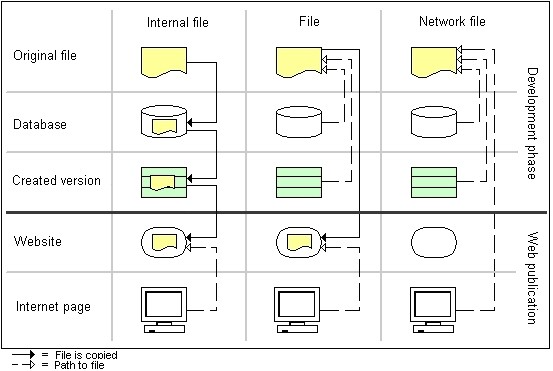
The different options determine whether a file is copied or if the path to the file is used, and where the copy or path is used within the process (database, created version or website).
