
What is process mining?
Process mining resembles a technique to understand and analyze processes by analyzing log files. Through extracting time registrations from your execution systems, like ERP or CRM, you can analyze process performance. Wacht the video below for an introduction to Process Mining:
What is Mavim Process Mining?
Mavim Process Mining is part of the Mavim Intelligent Transformation Platform. It offers you a suite of process mining and process intelligence features, helping you to analyze your data to improve and monitor your business performance. Next to that, you can leverage Mavim’s unique capability on Process Conformance Checking, allowing you to use your process designs to benchmark against your process performance to analyze fit-gaps and process conformance violations.
Onboarding Journey
Before you can start with Mavim Process Mining, there are a number of steps that need to be completed. This is what you can expect of the Mavim Process Mining Onboarding Journey.
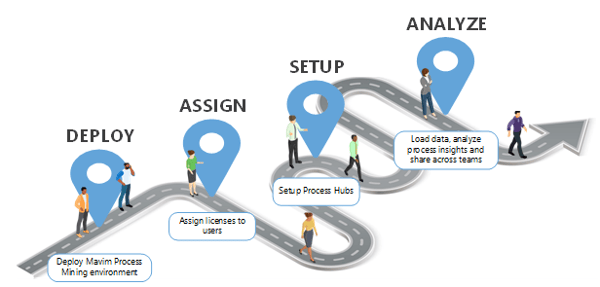
1. Deploy Mavim Process Mining environment
The Mavim Delivery team will deploy a Mavim Process Mining environment. The technical contact of your company will be notified via email when the deployment is completed. An onboarding email is sent to the technical contact with additional details. License information will be updated for your company in Mavim Connect Center. Follow the link for more information on Mavim Connect Center: Onboarding | Mavim Online
2. Assign licenses to users
The Mavim Connect Center (MCC) is your central hub for license management. Via MCC you can invite users and assign Mavim Process Mining licenses. The invited users will receive an automated onboarding email. Users need to accept and complete the onboarding by clicking the button in the email.
Depending on the assigned Mavim Process Mining license or add-on, certain functionalities in app is applicable to the user.
When a user is assigned a Mavim Process Mining license, the user will appear in the user overview list in Mavim Process Mining. See the following link to learn how to invite a user for Mavim Process Mining: How to assign Mavim Process Mining licenses in Mavim Connect Center
MPM Admin
You need to assign at least 1 user with MPM Admin permission in MCC. This MPM Admin permission gives the user(s) to access the Admin Settings area in Mavim Process Mining. In the Admin Settings area you can control generic application settings, control who can access, what users can access and what permissions are applicable for these users.
The MPM Admin permission include, but aren’t limited to, the following tasks:
-
Managing Process Hub(s)
-
Managing users, roles and permissions (RBAC) for each Process Hub
-
Configuring application features and settings
3. Setup Process Hubs
As MPM Admin you can set up a Process Hub in Mavim Process Mining. A process hub is a workspace environment tailored around a process area, for example Procure-to-Pay (P2P) or Order-to-Cash (O2C). In a Process Hub you can organize your data, dashboards and conformance check configurations. A process hub is licensed. Depending on the licensed quantity you can create more than one Process Hub. See the following link for more info: Set up your Process Hub for Process Mining analysis
Setup roles for a Process Hub
As MPM Admin you can create and configure a role with a permission set. A role is created within the context of a Process Hub. The permission set orchestrates what this role can perform inside a Process Hub. For example, the role Procure to Pay viewers only has the permission to open and view reports.
Assign users to a role
As MPM Admin you can assign users (with a valid license) to a role. In this way a user is granted access to a Process Hub. Users can be assigned to multiple roles. The permissions that are configured for that role are applicable to the assigned users. For example, when the user Andrew is assigned to the role Procure to Pay viewers, he is only allowed to open and view the reports within this Process Hub. See the following article: Setup role structure for a Process Hub (Process Mining)
4. Analyze process insights and collaborate
You have now successfully onboarded the first users to Mavim Process Mining. Users can now start with orchestrating their data, create report dashboards, analyze process insights and perform Conformance Checks. They are ready to start utilizing the features and functionalities of Mavim Process Mining.
Additional resources
Users working with Mavim Process Mining might be interested in learning and development through Mavim Academy or Mavim Knowledge Base.
Mavim Academy
Before getting started, you may want to learn a bit more about process mining. You can access Mavim Academy for detailed courses and micro-learnings to get a foundational understanding of process mining. It will also explain how to analyze process insights with Mavim Process Mining. A Mavim Academy license may be required to access certain courses. Follow the link to access the Mavim Academy: Mavim Academy
Mavim Knowledge Base
Detailed instructions and articles of Mavim’s Intelligent Transformation Platform are published in the Mavim Knowledge Base. The Knowledge Base functions as a central content hub for all your product-related questions and enquiries. The content is frequently updated and revised. Follow the link to access Mavim Knowledge Base: Mavim Knowledge Base
