
A shape is added to a chart as follows:
Select the shape you want to use on the stencil (for more information on stencils, see: Stencils).
1. Drag it onto the drawing page.
2. Type in a name.
When you want to automatically create a relationship between two shapes, you must do the following:
1. Select the shape you want to use on the stencil.
2. Drag it onto the shape you want to create a relationship with so that they are overlapping. You can determine where the relationship is formed by overlapping the preferred relationship connecting points of the two shapes, as shown below: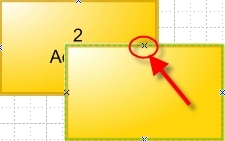
3. Release the mouse button, i.e. drop the shape, while it is hovering above the other shape. An automatic relationship will be created.
Note: If the name of the shape is preceded by a bullet (right-click the shape) the bullet will not be included in the tree structure. It will however remain visible in the Visio Chart.
