
The Distribution Centre can be started as follows:
1. Select Distribution Centre from the Version Management group on the Modelling tab.
The following screen appears:
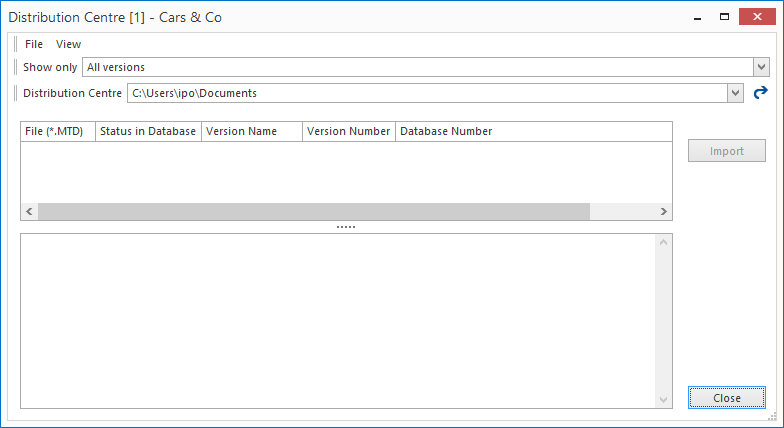
In this screen you can see the following sections:
Filter:
In the example, all of the transport databases in the Distribution Centre are shown. There are various filters that allow you to specify a more restricted view.
Distribution Centre:
This is the file location where the transport databases are stored.
Note: The file location is always returned to its default value when the distribution centre is started. This value is set centrally in the database: see File Locations. It is possible to allow other file locations to report when the distribution centre is opened.
Overview MTDXs:
These are the transport databases present in the distribution centre. The columns have the following meanings:
· File (*.mtdx): the name under which the MTDX is saved.
· Status in the database: is this MTDX also present as a (created or imported) version in the database?
· Version name: the name of the version (if present): A green or purple filing cabinet is only shown if a version is actually present in the database. See also Filing Cabinets.
· Version number: the number of the version from which the MTDX was made.
See also: Export Version.
· Database number: the number of the database that the MTDX comes from.
· Description: The selected MTDXs description (if one exists) is shown.
