You create a BPMN Collaboration and:
- Place a Data Store or Data Object beside a Task.
- Connect the association from the right side of the Data Store to the left side of the Task.
- Save and close the model.
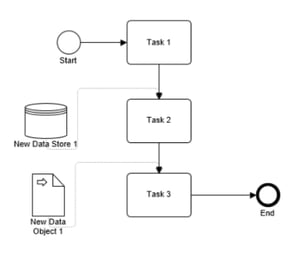
After reopening the Collaboration:
- The associations are automatically repositioned.
- Inputs are connected to the top of the Task instead of the left side.
- The connection points cannot be manually moved back to the left or right side.
In Mavim, the location of input and output connections is determined by the orientation of the BPMN model.
BPMN Collaborations
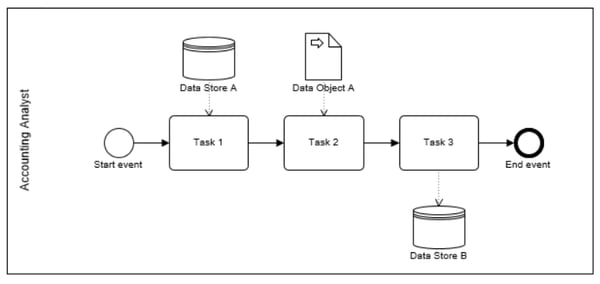
BPMN Collaborations are always displayed in a horizontal orientation.
In this orientation:
- Input associations are always connected to the top of a shape.
- Output associations are always connected from the bottom of a shape.
When a Collaboration is reopened, Mavim automatically restores the associations according to these rules.
BPMN Orchestrations
A BPMN Orchestration (a Process without a Pool or Lanes) can be displayed in either:
- Horizontal orientation
- Inputs connect to the top.
- Outputs connect from the bottom.
- Vertical orientation
- Inputs connect on the left.
- Outputs connect on the right.
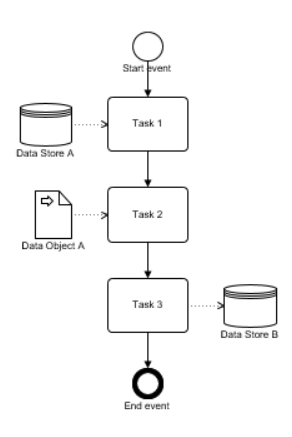
The connection points for BPMN associations are enforced by Mavim based on the orientation of the process. They cannot be manually repositioned to another side of the shape.
Expected BehaviorIf you require left-to-right input and output connections, use a vertical BPMN Orchestration. For BPMN Collaborations, the connection points will always follow the horizontal orientation rules and will be restored automatically whenever the model is reopened.