
Belangrijke informatie:
Microsoft publiceert de Business Process Catalog vanaf maart 2026 in twee formaten:
- Excel
- Mavim‑bestand (.mtdx)
De catalogus wordt nu direct gegenereerd vanuit Microsofts eigen Mavim‑omgeving.
Je kunt de bestanden downloaden via het Microsoft Download Center.
Meer informatie over de nieuwe release is hier te vinden :
What's new in the Business Process Catalog in March 2026 | Microsoft Learn
What's new in the Business Process Catalog in March 2026 | Microsoft Learn
Stappen om de Mavim‑versie te downloaden
-
Open het Microsoft Download Center:
Download Microsoft Dynamics 365 Business Process Catalog from Official Microsoft Download Center -
Selecteer Microsoft Dynamics 365 Business Process Catalog (Mavim).
-
Klik op Downloaden.
-
Kies het .mtdx‑bestand uit de lijst.
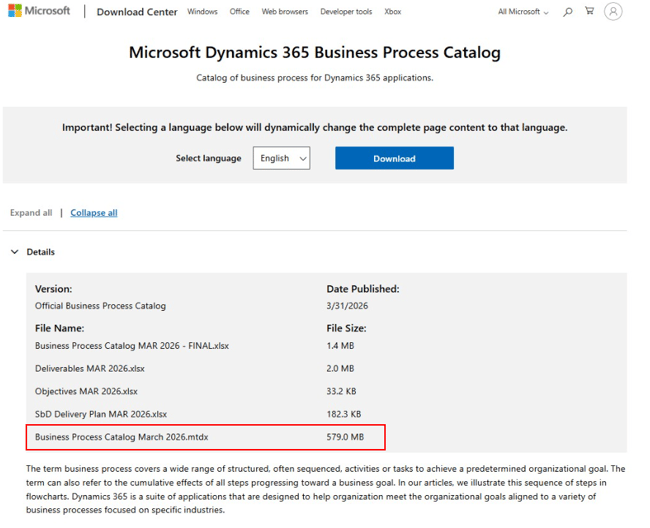
-
Sla het bestand op je computer op.
-
Importeer het .mtdx‑bestand in je Mavim‑omgeving.
Extra hulp
Voor een stapsgewijze uitleg over het importeren in Mavim Manager, zie:
https://learn.microsoft.com/en-us/dynamics365/guidance/business-processes/about-import-catalog-mavim-database
https://learn.microsoft.com/en-us/dynamics365/guidance/business-processes/about-import-catalog-mavim-database
5. Important notes / warnings / prerequisites
- Je hebt toegang nodig tot een Mavim‑omgeving om het .mtdx‑bestand te importeren.
- De bestandsgrootte kan variëren op basis van de catalogusinformatie.
- De downloadlink wordt beheerd door Microsoft, dus bestandsnamen of locaties kunnen bij toekomstige releases wijzigen.
