
The Objects section is visible in the Topics screen. During the use of Mavim all technical information is stored here. It is possible to see which parts of this information have been stored in the active database:
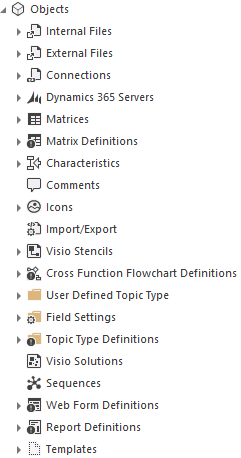
-
Internal Files and External Files: see Couple External Information to Topic.
-
Connections: see Couple with SAP
-
Matrices and Matrix Definitions: see Matrix.
-
Characteristics: see Characteristics and Merge Characteristics.
-
Revisions and Comments: see Revision Information and Comments.
-
User Defined Topic Type: see Topic Type.
-
Icons: see Icons.
-
Import/Export: see XML.
-
Word Themes: see Create Word Theme.
-
Web Theme
-
Visio Stencils: see Stencils.
-
Cross Function Flowchart Definitions: see Cross Function Flowchart.
-
Field Settings and Type Definitions: see Fields.
-
Visio Solutions: see Charts.
-
Web Form definitions: see Web Form Definitions
-
Report Definitions: see Reports
-
Templates: see Topic Templates
Import notes:
-
The Objects section is intended to be used as a consulting option. This section is populated automatically when you use the Mavim functions via the menus or toolbars.
-
It is only useful to directly add or modify topics for the Characteristics, Icons and Templates sections.
